
#
OpenRouter
OpenRouter is available as both a Text Completion and Chat Completion source. All models are available through either API, but their features may differ depending on the API type you choose. For example, image inlining and tool calling are only available with the Chat Completion API.
Don't want to sign up for a dozen API services, but still want access to all the latest models? Use OpenRouter.
OpenRouter works by letting you use a single endpoint to access models like DeepSeek, Claude, and Gemini, all in one service with a shared credit pool.
It has a free trial (about $1) and paid access afterward. No subscription or monthly bill - you pay for what you actually use. Some models have free access with a limited number of daily requests.
To get permanent access to free models with a generous daily limit, you need to buy at least $10 in credits once.
See more details on the OpenRouter FAQ page.
- Create an OpenRouter account: openrouter.ai
- OpenRouter Models List
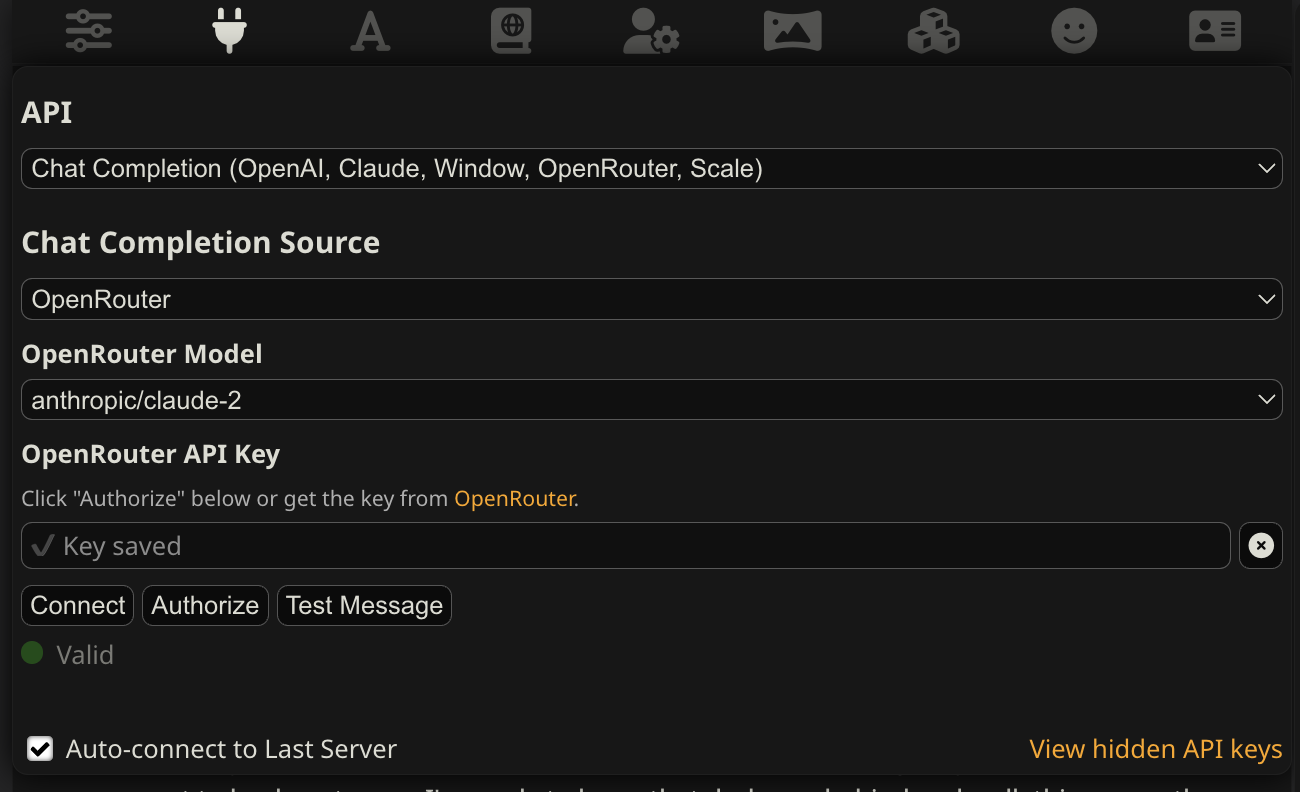
From top to bottom (see image above):
- Select the 'Chat Completion' API.
- Select OpenRouter as the source.
- Click "Authorize" to get a key using the OAuth flow. Alternatively, generate an API key here and paste it into the box.
- Click "Connect" and select a model.
- (Optional) Use the "Test Message" button to verify your connection.